Private AI Stack From Open Source (Part 2)
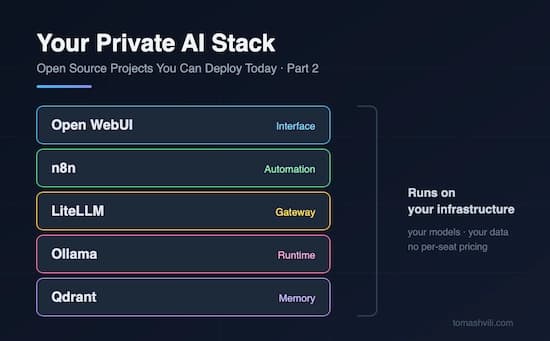
In Part 1 I shared a mix of open-source tools from different worlds: image generation, LLMs, BI dashboards, customer support. This time I want to do something different. Instead of five random tools, here are five projects from a single domain that fit together like LEGO blocks.
Put them together and you get a complete, private AI platform running on your own infrastructure.
This matters because right now every company I talk to has the same two problems. Employees are already pasting company data into public AI chatbots (whether IT knows it or not), and AI vendor bills are growing every month with per-seat pricing that punishes you for adoption. Self-hosting solves both. Your data stays on your servers, and your costs are your infrastructure, not a seat count.
Here's the stack: ⬇️
Ollama — The Runtime
This is where everything starts. Ollama lets you run powerful open models (Llama, Mistral, Qwen, DeepSeek, Gemma) with a single command.
No CUDA configuration nightmares, no Python dependency hell. ollama run llama3 and you have a local LLM answering questions.
It runs on a laptop for experiments and scales to GPU servers for production.
Use cases: Run LLMs completely offline with zero data leaving your network. Power internal assistants for teams handling sensitive data (legal, healthcare, finance). Prototype AI features locally before paying for any API. Serve an OpenAI-compatible API endpoint your existing apps can point to.
Open WebUI — The Interface
A model is useless if only engineers can reach it. Open WebUI gives you a polished, ChatGPT-style interface on top of Ollama (or any OpenAI-compatible API). It has user accounts, role-based access, chat history, and built-in RAG, so you can upload your documents and chat with them. This is the piece that turns "we have a model running" into "the whole company has private ChatGPT."
Use cases: Deploy a private ChatGPT alternative for your entire organization. Let teams chat with internal documents, wikis, and PDFs. Give different departments access to different models and knowledge bases. Replace multiple AI chatbot subscriptions with one self-hosted portal.
n8n — The Automation Layer
Chat interfaces are nice, but the real value shows up when AI starts doing work while you sleep. n8n is a workflow automation platform (think Zapier, but open-source and self-hosted) with first-class AI and agent nodes. Drag, drop, and connect LLMs to your email, CRM, Slack and databases, with over 400 integrations.
Use cases: Auto-triage and draft replies to incoming support emails. Summarize documents and post digests to Slack or Teams. Build AI agents that enrich CRM leads, categorize invoices, or monitor feeds. Connect your local Ollama models to real business workflows without writing code.
LiteLLM — The Gateway
Realistically, you won't run everything locally. Sometimes you need Claude or GPT for the heavy tasks and local models for the routine ones. LiteLLM is a proxy that sits in front of 100+ LLM providers (including your own Ollama server) behind one unified API. It gives you per-team API keys, spend tracking, rate limits, and fallbacks. This is how IT takes back control of AI usage without blocking it.
Use cases: Give every team an API key with its own budget and rate limit. Track exactly who spends what across OpenAI, Anthropic, and local models. Route cheap tasks to local models and hard tasks to frontier APIs automatically. Swap providers without changing a single line of application code.
Qdrant — The Memory
Every serious AI application eventually needs memory: the ability to search your own data by meaning, not just keywords. Qdrant is a fast, production-grade vector database written in Rust, and it deploys with a single Docker container. It's the engine behind RAG: your documents get embedded, stored, and retrieved so your models can answer with your knowledge instead of hallucinating.
Use cases: Build RAG pipelines over internal docs, tickets, and knowledge bases. Add semantic search to your product or intranet. Give long-term memory to AI agents built with n8n. Power recommendation and similarity features without a managed-service bill.
The Full Picture
With five open-source projects you have:
- A runtime for your models (Ollama)
- An interface for your people (Open WebUI)
- An automation layer for your workflows (n8n)
- A gateway for control and cost visibility (LiteLLM)
- A memory for your knowledge (Qdrant)
Together they make up the same architecture the AI platform vendors are selling, except it runs on your infrastructure, with your data, at infrastructure cost.
The Hidden Challenge (Again)
If Part 1 had a deployment problem, Part 2 multiplies it by five. Each of these projects is easy to demo on a laptop. Running them together, in production is a real DevOps project: GPU drivers, networking between services, SSO, backups, updates, TLS. And this is exactly where most teams stall: excited after the demo, stuck three weeks later.
For teams that want the stack without the struggle, 🔥 DeployForMe.com handles the deployment of these open source tools on your own cloud accounts or servers, wired together and configured to your requirements. You keep full ownership and control of your infrastructure, and you skip the part where your team burns a month on Docker networking. Compared to hiring dedicated DevOps consultants (often $10-20K for complex projects), it's a cost-effective way to get your private AI stack actually running, not just starred on GitHub.